
Tenancy and permissions
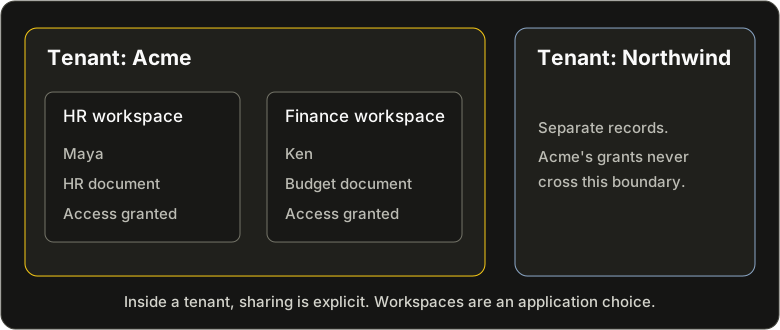
Maya and Ken work at Acme. Another company, Northwind, uses the same application and database. Maya writes a private HR document. Ken works in Finance.
Two boundaries matter here. Northwind must never see Acme's document. And being an Acme employee should not, by itself, give Ken access to HR's work.
Tenancy separates customers. Permissions control access to resources inside that boundary. You can use either feature independently, or combine them.
Keep each customer's data separate
A tenant identifies the customer whose data a request is working with. Your application chooses that tenant after authenticating the request and checking that the person belongs to it.
Declare the boundary once in RSL:
tenancy {
  scope = "required"
  field = "tenant_id"
}
Bind the selected tenant to the request's client, and ordinary queries stay in that tenant. Creates receive its tenant ID. An explicitly conflicting ID is rejected. Reads, updates, deletes, and relationship queries keep the same boundary.
This is a required guard on tenant-scoped models, not a filter each handler has to remember. A request without a tenant is rejected rather than allowed to query every customer's rows. Adding a custom application policy cannot remove the guard.
Acme and Northwind can therefore share a database without sharing their data. But tenancy alone does not decide which Acme employees can read an Acme document. That is the next question.
Decide who can use a resource
Permissions describe relationships between people and resources: who owns a document, who it has been shared with, or which workspace supplies access.
Suppose Document.author is a relationship to the User who created it. The
permission part of that schema can start with:
access {
  subjects = [User]
}

permissions Document {
  // Authors can read their work and share it with individual users.
  viewer = author or [User]

  read          = viewer
  create        = anyone
  update        = author
  delete        = author
  manage_grants = author
}
Here, [User] means that a document can have individual users assigned as
viewers. It does not mean that every user can read it. The
permissions guide builds the complete example.
Maya can read and edit her document. Ken cannot read it until Maya shares it with him. If access should follow a workspace instead, a rule can follow the document's workspace relationship and its membership rules.
With tenancy enabled, these permissions operate inside the selected tenant.
Sharing a document does not turn into permission to cross a customer boundary.
Even a public read rule remains inside that boundary for tenant-scoped requests.
| Request | Result |
|---|---|
| Maya reads her document in Acme | Allowed by its author relationship. |
| Ken reads it in Acme before it is shared | Denied, even though he belongs to Acme. |
| Ken reads it in Acme after receiving a viewer grant | Allowed to read. The grant does not let him edit. |
| A Northwind request tries to reach the Acme document | It cannot reach the document through the tenant boundary. |
Add an application-specific restriction when you need one
Some decisions depend on application behavior rather than resource relationships. For example, an account under administrative review might allow reading while temporarily rejecting writes.
A custom Rust application policy can add that restriction around generated operations. It can reject an operation or narrow the rows it may touch. It does not replace the tenant guard or grant access that the RSL permission rules deny. An author can have permission to edit while an account-wide rule temporarily prevents the edit.
These policies are a general extension point, so they can express some of the
same conditions as permission rules. You usually do not need that duplication:
keep customer isolation in tenancy, and ownership, sharing, and inherited
access in permissions. Reach for a Rust policy when the application needs an
additional rule. Hooks and interceptors
provide other ways to customize behavior around reads and writes.
Choose only what your application needs
- Neither feature: use Rent as an ordinary ORM.
- Tenancy alone: separate customers without defining per-resource permissions.
- Permissions alone: control resource access without a tenant boundary.
- Both: first keep customers separate, then apply each resource's access rules.
With both enabled, a normal request must satisfy both boundaries, along with any additional application policy. There is no need to repeat those rules in each CRUD handler. Give each handler a client scoped to the request.
Keep trusted access deliberate
These protections apply through Rent's scoped client. A root client can create
an explicit system() handle for trusted operations, such as maintenance across
tenants. Keep that authority out of ordinary request handlers. Having an
administrator viewer does not, by itself, remove the tenant boundary.
Direct database connections and SQL you author need their own access controls. PostgreSQL row-level security can add enforcement inside the database. Its SQL policies are separate from both Rent's Rust application policies and RSL relationship permissions. See database features for that additional layer.
Continue with multi-tenancy to bind a tenant, or permissions to model ownership and sharing.